Social Media Content Calendar: The 30-Day Plan (2026)
Most content calendars fail because they schedule dates, not decisions. Here is the pillar system, batching workflow and 30-day template that fixes it.
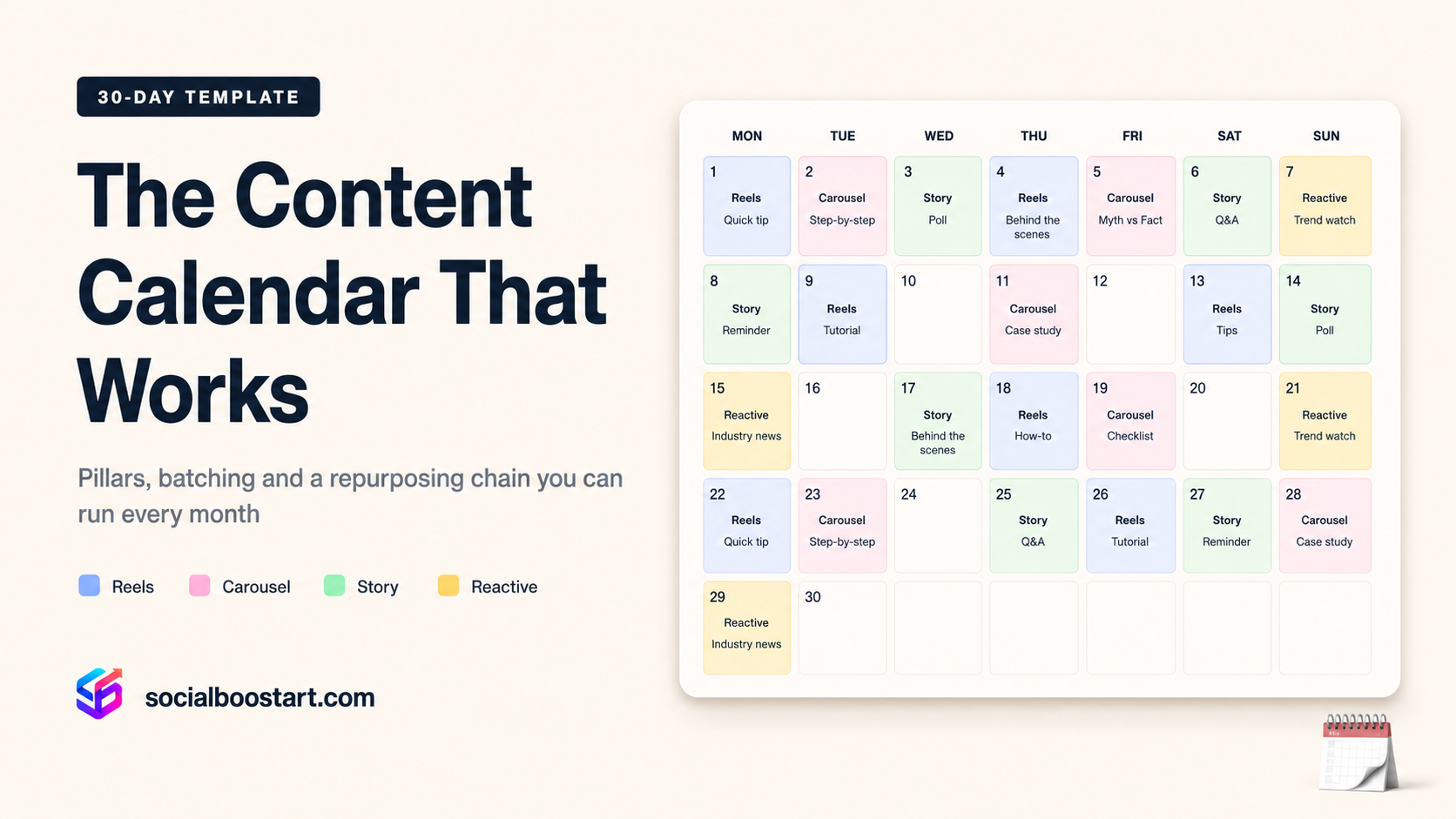
Almost every creator and small brand has built a content calendar. Almost none of them are still using it in week six. The spreadsheet exists, the colour coding is beautiful, and the last filled cell is dated three Tuesdays ago. The failure is so consistent that it stops being a discipline problem and starts being a design problem: the calendar was built to answer the wrong question.
A calendar that lists dates tells you when to post. It does not tell you what to make, why that thing exists, how long it will take to produce, or how you will know it worked. So every morning you re-open a decision you thought you had already closed, and the cost of that re-decision — usually 30 to 60 minutes of scrolling for inspiration — is what actually kills the habit.
This is a working system, not a template dump. It covers the pillar structure that turns 30 blank slots into 30 pre-made decisions, a realistic cadence based on what each format costs to produce, a three-day weekly batching workflow with time estimates, a repurposing chain that stretches one long asset across a week, the reactive slots that let you chase a trend without breaking the plan, and the review loop that tells you what to change in month two. The full 30-day table is below.
Why Most Content Calendars Fail
Look closely at a failed calendar and you will usually find the same four defects.
- It schedules dates, not decisions. "Tue 14 — Reel" is not a plan. "Tue 14 — Teach pillar — 35-second screen-record answering the most common question from last month's DMs — optimising for saves" is a plan. One of those you can execute half-awake; the other requires a fresh creative act at 8am.
- It ignores production cost. People plan a cadence they admire rather than one they can afford. Seven posts a week across three platforms is not a schedule, it is a part-time job you did not budget for.
- It has no slack. A calendar packed to 100% capacity breaks the first time a client call runs long. One missed day cascades, and the plan stops feeling like a plan.
- It has no feedback loop. Month two looks identical to month one because nobody defined what "worked" meant before the month started, so no data could change anything.
Fix those four and the calendar stops being a wish list and becomes an operating document.
The Content Pillar System: Decide Once, Post Thirty Times
Pillars are recurring content categories, each with a distinct job. Three is the practical minimum, five is the ceiling — beyond that the account reads as unfocused and, more importantly, you cannot hold the structure in your head. Each pillar needs three things defined in writing: what it covers, who it is for, and the single metric it exists to move.
That last part matters more than it sounds. A pillar built to attract strangers and a pillar built to convert existing followers are judged by completely different numbers. Measuring both by likes tells you nothing.
Fitness coach (online 1:1 programming)
- Fix It — form corrections and common training mistakes. Short, searchable, demonstrable. Optimised for saves.
- Proof — client progress, honest timelines, what the 12-week middle actually looks like. Optimised for profile visits.
- Myth — a strong, defensible opinion on a contested topic (fasted cardio, soreness, step counts). Optimised for comments.
- Human — the coach's own training, failures, food, routine. Optimised for story replies and DMs.
B2B SaaS (project tool, 30-day trial)
- Workflow — a real 60-second walkthrough of one job the tool does. Optimised for watch-through rate.
- Benchmark — how teams in the category actually operate; numbers, not slogans. Optimised for shares.
- Build — changelog, roadmap reasoning, why a feature was cut. Optimised for comments from existing users.
- Customer — a named team, a named problem, a specific before/after. Optimised for link clicks.
Local business (neighbourhood coffee roaster)
- Craft — roasting, sourcing, brewing technique. Optimised for saves.
- Place — the street, the regulars, the neighbourhood at 7am. Optimised for reach among local accounts.
- Menu — what is on today, seasonal drops, price and hours in plain text. Optimised for direction taps and story replies.
- People — staff, suppliers, the customer who has come every day for six years. Optimised for shares.
Once the pillars exist, filling a month takes about twenty minutes, because you are no longer asking "what should I post?" — you are asking "what is this week's Fix It?" That is a far smaller question.
Cadence Is a Production Budget, Not an Ambition
Decide cadence by multiplying format cost by frequency and checking the total against the hours you genuinely have. The estimates below are typical working ranges for a solo operator with a phone, a light and basic editing software — treat them as planning estimates, not laws.
| Format | Est. production cost | Sustainable solo cadence | Primary job |
|---|---|---|---|
| Short-form video (Reels / TikTok / Shorts) | 45–90 min each, end to end | 3–5 per week | Reach new viewers |
| Carousel / multi-image post | 60–120 min | 1–2 per week | Saves and depth |
| Static image + written caption | 20–30 min | 1–2 per week | Offer, news, community |
| Stories | 10–15 min per day | Daily-ish, 3–5 frames | Replies, retention, trust |
| Long-form video / podcast (source asset) | 3–5 hours | 1 per week or fortnight | Feedstock for everything else |
| Text posts (X / threads) | 5–10 min | Daily, if it is your home platform | Distribution and testing ideas |
Now the arithmetic. Suppose you plan four short-form videos, one carousel and daily stories. That is roughly (4 × 70 min) + 90 min + (7 × 12 min) = 280 + 90 + 84 = 454 minutes, about 7.5 hours a week — before community management. If you have four hours, you do not have a discipline problem, you have a plan that was never physically possible. Cut to two videos and one carousel and you are at roughly 4.5 hours.
The second input is your own data. Rather than copying a generic "post 5x a week", run your last 12 posts through an Instagram engagement calculator and look at what happened when your frequency changed. If per-post engagement rate held steady when you moved from three to five posts, the extra volume is being absorbed. If it dropped sharply, you bought reach with quality and the market noticed. Timing sits on top of that — our breakdown of the best time to post on Instagram by niche and time zone is more useful once your cadence is fixed, not before.
The 30-Day Content Calendar Template
This is a four-pillar, five-post-per-week structure with one reactive slot and one genuine rest day each week — the shape most solo operators can actually hold. Substitute your own pillar names; the rhythm is the point.
| Day | Pillar | Format | Goal metric |
|---|---|---|---|
| 1 (Mon) | Teach | Short video: answer the #1 question you got last month | Saves |
| 2 (Tue) | Human | Story sequence, 4 frames, one with a poll | Replies |
| 3 (Wed) | Proof | Carousel: one result, full timeline, honest caveats | Shares |
| 4 (Thu) | Reactive | Open slot: trend, news or comment reply video | Reach |
| 5 (Fri) | Perspective | Talking-head opinion, 40–60 sec | Comments |
| 6 (Sat) | Repurpose | Clip from long asset, cross-posted to TikTok/Shorts | New-viewer reach |
| 7 (Sun) | — | Rest. Reply to comments and DMs only, 30 min | Response rate |
| 8 (Mon) | Teach | Short video: the mistake beginners make in week one | Saves |
| 9 (Tue) | Human | Behind-the-scenes of the batching day itself | Replies |
| 10 (Wed) | Proof | Short video: screen-record or before/after demo | Profile visits |
| 11 (Thu) | Reactive | Open slot | Reach |
| 12 (Fri) | Perspective | Carousel: "three things everyone in this niche gets wrong" | Comments |
| 13 (Sat) | Repurpose | Second clip from the same long asset, new hook | Watch-through |
| 14 (Sun) | — | Rest + 20-minute week-two review | — |
| 15 (Mon) | Teach | Short video: step-by-step of one narrow process | Saves |
| 16 (Tue) | Human | Stories: a mistake you made this week | Replies |
| 17 (Wed) | Proof | Carousel: numbers, method shown, no hype | Shares |
| 18 (Thu) | Reactive | Open slot — or rerun of a week-one winner with a new hook | Reach |
| 19 (Fri) | Perspective | Short video responding to a common objection | Comments |
| 20 (Sat) | Repurpose | Quote card / text post pulled from the long asset | Shares |
| 21 (Sun) | — | Rest | — |
| 22 (Mon) | Teach | Short video: advanced version of the day-1 topic | Saves |
| 23 (Tue) | Human | Stories: AMA box, answer live in frames | Replies |
| 24 (Wed) | Proof | Short video: one customer, one problem, one outcome | Link clicks |
| 25 (Thu) | Reactive | Open slot | Reach |
| 26 (Fri) | Offer | Static post: what you sell, plainly, once a month | Link clicks / DMs |
| 27 (Sat) | Repurpose | Final clip from long asset, best-performing hook reused | New-viewer reach |
| 28 (Sun) | — | Rest | — |
| 29 (Mon) | Teach | Short video: recap of the month's best-performing idea | Saves |
| 30 (Tue) | Review | No publishing. Monthly review + next month's 30 briefs | — |
Notice that only two of the thirty days are genuinely optional creative acts. Everything else is a slot with a pillar, a format and a metric already attached.
The Three-Day Batching Workflow
Batching works because context-switching is the real cost of content, not filming. Setting up a light, framing a shot and getting your voice warm takes the same 25 minutes whether you record one video or eight.
Day A — Filming (3–4 hours, one block)
- Set up once: light, phone, mic, clean background. 20–25 min.
- Record the long asset first, while you are freshest — a 20–30 minute talk, interview or full walkthrough. 45–60 min.
- Record 6–8 short-form pieces back to back, changing only the top layer between takes. 90–120 min.
- Shoot 15–20 B-roll and still frames for carousels and stories. 20 min.
Day B — Editing (3–4 hours)
- Dump, rename and sort clips by pillar. 20 min.
- Edit short-form at roughly 15–20 minutes per finished video. Six videos ≈ 2 hours.
- Caption pass, spelling check, mute-friendly text. 30 min.
- Build the carousel from stills and the long asset's best paragraph. 40 min.
Day C — Scheduling (60–75 minutes)
- Load everything into the scheduler with final captions. 30 min.
- Write hooks last, when you have seen the finished edit — hooks written before filming rarely match the cut. Use the patterns in our guide to Instagram Reels hook formulas. 20 min.
- Leave Thursday empty on purpose. 0 min.
- Write the one-line brief for next week's long asset. 10 min.
Total: roughly 8–9 hours for 12 published pieces, or about 42 minutes per post. Producing the same twelve pieces ad hoc, one at a time, realistically costs 80–100 minutes each once you include the daily "what do I post today" tax. Same output, roughly half the hours.
The Repurposing Chain: One Asset, One Week
The long asset from Day A is the spine. A single 25-minute recording reliably yields:
- 3 short-form clips — the three moments where you said something specific enough to stand alone. Different hooks, different thumbnails, published days apart.
- 1 carousel — the argument's structure, one slide per step, screenshots or stills as visuals.
- 1 text post — the single sharpest sentence, no video, for X or a caption-first post.
- 1 story sequence — the messy version: what you cut, what you got wrong, a poll asking which point to expand.
- 1 newsletter or blog section — the transcript, edited down, which becomes next month's search-visible page.
Two rules keep this from feeling like spam. First, re-hook, do not re-post: the same 40 seconds with a new opening line is a new piece of content to a new viewer, and platforms increasingly show short video to people who do not follow you. Instagram's own creator guidance on Reels and original content is worth reading directly at creators.instagram.com rather than through second-hand summaries. Second, stagger by platform: a clip that goes to Reels on Wednesday goes to TikTok on Saturday and Shorts the following Monday, so the same audience overlap never sees it three times in a day.
Reactive Slots: Planning For The Unplanned
A calendar with no gaps cannot respond to anything, and a calendar that is entirely reactive is just anxiety with a spreadsheet. The fix is a fixed number of deliberately empty slots — in this template, four per month, every Thursday.
Rules for a reactive slot:
- It must still map to a pillar. A trend you cannot connect to Teach, Proof, Perspective or Human is a trend for someone else's account.
- It has a hard time cap: 45 minutes from idea to publish. If it needs more, it becomes next week's planned slot instead.
- If nothing is worth reacting to by Thursday morning, the slot is not wasted — use it to re-cut the best performer from the previous fortnight with a new hook. That is usually a better use of the time than a forced trend anyway.
The strongest reactive material is rarely a platform-wide trend. It is a comment on your own post from Tuesday that 40 people replied to. Answering it on video is native, fast, and it tells the algorithm and your audience the same thing: this account is present.
When a Post Underperforms Mid-Month
You need a threshold defined in advance, otherwise every post feels like a referendum. A workable rule: take the median reach of your last 12 posts and flag anything that lands under 60% of it after 48 hours.
Worked example: your last 12 posts have a median reach of 4,200. A Wednesday Proof carousel reaches 1,900 after two days. 1,900 ÷ 4,200 = 0.45, so it hit 45% of median — below the 60% line, so it gets diagnosed. Then check the sequence in order:
- Reach low, retention low. The hook failed. Nobody stayed long enough for distribution to widen. Re-cut with a different first three seconds and re-publish in a reactive slot.
- Reach low, retention high. The content works but the entry point was weak — wrong cover frame, wrong topic framing, wrong timing. This is the cheapest fix: the asset is fine, the packaging is not.
- Reach normal, engagement low. People saw it and did not care. That is a pillar problem, not a production problem, and it is the only failure that should change your plan.
Do not rewrite the month after one weak post. Variance is enormous at any account size, and a single below-median post is noise. Two consecutive misses in the same pillar is signal — that is when you change the brief.
There is also a distribution reality worth naming: a pillar's first post has no history behind it, so it starts colder than anything else you publish. When you launch a new pillar and the format itself is untested, some accounts give that opening post an early nudge — a modest push to buy Instagram views on the launch Reel, or buy TikTok views if the pillar lives there, so the video clears its first distribution round instead of dying in a 200-impression sample. That is a signal-quality lever, not a growth strategy: it only helps if the content already holds attention, and it never replaces the pillar work above. Any provider asking for your account password is not one to use — legitimate delivery never requires login credentials.
The Review Loop: Weekly vs Monthly
Reviewing everything every week produces panic. Reviewing nothing produces month twelve that looks like month one. Split it.
Weekly (15 minutes, Sunday)
- Did every planned slot actually publish? Yes/no, no analysis.
- Which single post over-performed relative to median, and what was its hook?
- Comments and DMs: what question came up more than twice? That is next week's Teach slot, written for you.
Monthly (60 minutes, day 30)
- Each pillar's one metric, month over month. Teach → saves. Proof → profile visits or clicks. Perspective → comments. Human → story replies.
- Follower change against posting volume, so you can tell growth from noise. An Instagram growth tracker makes this comparison honest, because memory always flatters the good weeks.
- Engagement rate trend, not a single month's number.
- Production hours actually spent versus planned. If you overran by 40%, next month's cadence comes down, not your standards.
Second worked example: an account with 8,400 followers averages 312 likes, 44 comments and 61 saves per post. That is 312 + 44 + 61 = 417 interactions; 417 ÷ 8,400 = 4.96% engagement rate (an estimate that moves with reach and format mix). If next month saves rise to 95 while likes stay flat, the Teach pillar is working even though the vanity number barely moved — which is exactly why each pillar carries its own metric. Running the calculations in one place through the free growth tools hub keeps the comparison consistent from month to month.
One caution on benchmarks: engagement rate falls naturally as an account grows, because reach spreads across a larger, less committed follower base. A drop from 5% to 3.6% while follower count doubled is usually growth, not decline. Compare yourself to your own trailing three months, not to a screenshot from a different account in a different niche.
Key Takeaways
- Calendars fail when they schedule dates instead of decisions — every slot needs a pillar, a format and a target metric written before the month starts.
- Three to five pillars, each with its own success metric, turn "what do I post?" into a twenty-minute monthly task.
- Set cadence by multiplying format cost by frequency and checking it against real available hours; roughly 7.5 hours a week buys four short videos, one carousel and daily stories.
- Batching into one filming day, one editing day and one scheduling day produces about twelve pieces in 8–9 hours — near half the per-post cost of daily improvisation.
- Leave four reactive slots a month with a 45-minute time cap, and diagnose underperformers against a 60%-of-median rule rather than reacting to every post.
- Review completion and hooks weekly; review pillar metrics, growth and production hours monthly. All engagement and reach figures here are planning estimates, not guarantees.